I added an IIJmio eSIM on the au (KDDI) network to the Pixel 9a I bought in [2025-05-04-1] , making it a dual SIM setup. I did this on May 17 (Sun).
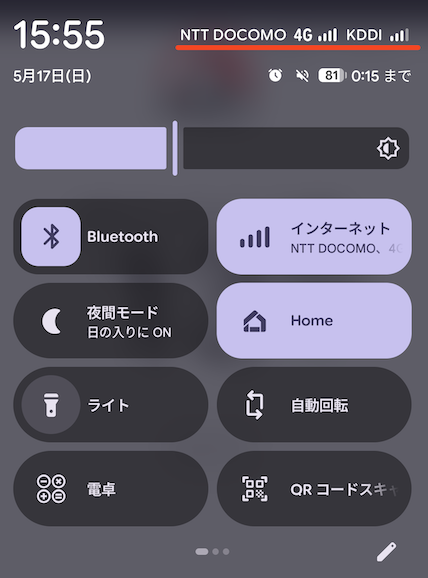
Why I Added an eSIM
I had been using IIJmio’s docomo network with a physical SIM for a long time, but the signal was often poor.
I went back and forth between “switching the docomo line to au” and “adding an au line,” and for now I went with adding one. Here’s why:
- If I switched outright and things didn’t improve — or worse, got worse — I’d be stuck
- If au turns out to be better than docomo, I can switch the physical SIM to au later
- At that point, I could even sign up for a docomo eSIM as a backup
From Signup to Activation
I signed up for a new eSIM through the “Purchase / Apply” button on IIJmio .
There was one thing to watch out for here. If you set the SIM function to “data communication,” the network type appears to be locked to docomo. To choose the au network, I had to select “voice + SMS + data communication.” I don’t need a phone number, but there was no way around it.
Put another way, if you want the docomo network, you can use a “data communication” eSIM. You avoid having an unnecessary phone number, and it’s a bit cheaper too.
For identity verification, I downloaded the “Honnin Kakunin for IIJmio” app on my phone and verified with my My Number card. The page said it could take a few days, but in practice the confirmation email arrived 5 minutes later.
Where I Stumbled a Bit
When I opened the activation code page, I couldn’t select a service code, so I assumed things were still being processed.
Looking more carefully, the page said this:
サービスコードを選択できない場合、一度会員専用ページからログアウトをおこなった上で、再度ログインください。
(English translation) If you cannot select a service code, please log out of the members-only page once and then log in again.
After logging out and back in, I was able to proceed. It’s my own fault for skimming past it, but since this kind of thing is unusual, I think it’s easy to miss.
After that, I activated the eSIM following the official setup guide .
There’s something to do here as well: you need to set the “Access Point Name” from “Mobile data settings” in STEP 4. I skipped this at first and went straight to testing the connection, which didn’t work, and it took me a while to figure out why.
Speed and Data Sharing
I turned off Wi-Fi at home and measured with https://fast.com/ . On day one, while still on 4G, the au line hit 97 Mbps. The docomo line was 13 Mbps on 5G.
The next day, once the au line switched to 5G, it got a bit faster at 130 Mbps. Different day, different time of day, so take these numbers with a grain of salt.
That said, what I’m after is stability rather than speed.
I was also able to set up data sharing. Since I set “mobile data” to au in the primary SIM settings, data always goes over au, and docomo’s available data is automatically shared.
Both of my plans have 5 GB, so effectively I get to use 10 GB per month over the au line.
Cost
Thanks to a campaign, the ¥3,000 initial fee was fully discounted, and the monthly base fee gets a ¥410 discount for 6 months.
Here’s what the bills look like, combined with my existing docomo line. Both are on IIJmio’s Giga Plan, with a monthly base fee of ¥864 (excl. tax).
May 2026 Usage (Billed ¥1,149)
| Item | docomo (existing) | au (new) |
|---|---|---|
| Initial fee | — | ¥3,000 |
| Monthly base fee | ¥864 | ¥4171 |
| Initial fee discount | — | -¥3,000 |
| Monthly base fee discount | — | -¥410 |
| Call charges | ¥130 | — |
| Other carrier interconnection charges | ¥40 | — |
| Telephone Universal / Relay Service fee | ¥3 | ¥1 |
| Subtotal | ¥1,037 | ¥8 |
Subtotal ¥1,045 + consumption tax ¥104 = ¥1,149 billed
June 2026 Usage (Billed ¥1,896)
| Item | docomo (existing) | au (new) |
|---|---|---|
| Monthly base fee | ¥864 | ¥864 |
| eSIM issuance fee (Type A) | — | ¥200 |
| Monthly base fee discount | — | -¥410 |
| Call charges | ¥200 | — |
| Telephone Universal / Relay Service fee | ¥3 | ¥3 |
| Subtotal | ¥1,067 | ¥657 |
Subtotal ¥1,724 + consumption tax ¥172 = ¥1,896 billed
For the first month, the initial fee discount and proration meant the au line cost me almost nothing. June includes a ¥200 eSIM issuance fee, but that’s a one-time charge.
The monthly base fee discount ends after 6 months, so after that the au line will add roughly ¥867 (excl. tax) in full. A steady state of just under ¥2,000 a month for two lines seems likely. Very cheap indeed.
Impressions After Two Months
As for the signal — the thing that actually matters — I think it has improved.
With docomo, there were quite a few places where I’d think, “the signal is bad here?” Since moving to au, I feel like I don’t notice that anymore.
I plan to switch the physical SIM to au as well, but since the 6-month monthly discount is still in effect, I’ll get to it around the time that runs out.
I hope this helps someone.
References
-
Prorated for the 15 days from the May 17 billing start through the end of the month ↩︎